Friday, 23 June 2017

Data types, Variable & Modifiers

Data Types:


Data types represent the different values to be stored in the variable. In java, there are two types of data types:
  • Primitive data types 
  • Non-primitive data types

Primitive Datatypes:

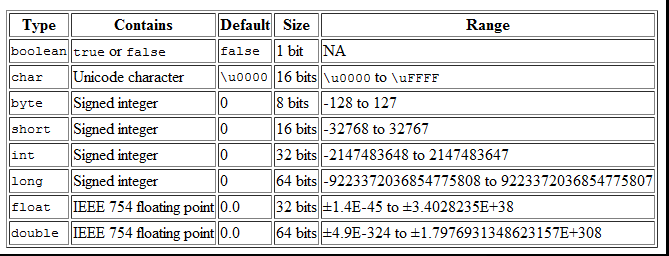
There are eight primitive datatypes supported by Java. Primitive datatypes are predefined by the language and named by a keyword. Below table gives more details of these eight primitive data types.


Non-primitive Datatypes:

Also called as reference variables which are an object of the class. These variables are declared to be of a specific type that cannot be changed. For example, Student, String etc.

String is a reference variable but not primitive. When you are creating a variable using String means you are creating an object of String class.

  • Class objects and various type of array variables come under reference datatype. 
  • Default value of any reference variable is null. 
  • A reference variable can be used to refer any object of the declared type or any compatible type.


Java Variables:
Variables are typically used to store information which your Java program needs to do its job. This can be any kind of information ranging from texts, codes (e.g. country codes, currency codes etc.) to numbers, temporary results of multi step calculations etc.

In Java there are four types of variables:

  • Local variables 
  • Instance variables 
  • Class/Static variables
public class School{

   //class/static variable
   static int schoolRegNumber = 12345;

   //Instance variable
   int studentAge; 
   
   public int getStudentAge(){
      //It's a local variable
      boolean isStudent = true;
      return studentAge;
   }

}


Local Variables:

A local variable in Java is a variable that’s declared within the body of a method. Then you can use the variable only within that method. Other methods in the class aren’t even aware that the variable exists.

From above example in the method getStudentAge(), we declared a boolean variable isStudent which is a local to that method only. Any thing outside method can't see this variable or access it. Thus it is called local variable

Unlike class and instance variables, a local variable is fussy about where you position the declaration for it: You must place the declaration before the first statement that actually uses the variable.

Instance Variables:

Instance variable is the variable declared inside a class, but outside a method without static keyword: something like studentAge in above example.

Now this Student class can be instantiated in other class to use this variable, something like:


public class MainClass{
    public static void main(String[] a){
       School school = new School();
       school.studentAge = 20;
    }
}

Variables defined within a class are called instance variables because each instance of the class (that is, each object of the class) contains its own copy of these variables. Thus, the data for one object is separate and unique from the data for another. An instance variable can be declared public or private or default (no modifier). When we do not want our variable’s value to be changed out-side our class we should declare them private. public variables can be accessed and changed from outside of the class. We will have more information in OOP concept .

Class/Static Variables:

These are also known as static member variables and unlike instance variables there's only one copy of that variable that is shared with all instances of that class. If changes are made to that variable, all other instances will see the effect of the changes.

In above example, schoolRegNumber variable is declared as static as a school always have the same registration number and it does not change. So any instance created for the Student class the school registration number is shared and remains same. If changes are made to that variable, all other instances will see the effect of the changes. 


Java Constants:


A Constant is a source code representation of a fixed value. They are represented directly in the code without any computation.

This is achieved by using final keyword. Once declared with final keyword, the value of that variable cannot be changed.

Constants can be assigned to any primitive or non-primitive datatype variables. For example −

final int age = 20;
final int regNumber = 12345;
final float piValie = 3.14;
final String schoolName = "Trinity";//non-primitive

Java Access Modifiers:

The access modifiers in java specifies accessibility (scope) of a data member, method, constructor or class.
There are 4 types of java access modifiers:
  • private 
  • default 
  • protected 
  • public

Private:

If a method or variable is marked as private (has the private access modifier assigned to it), then only code inside the same class can access the variable, or call the method. Code inside subclasses cannot access the variable or method, nor can code from any external class.

Classes cannot be marked with the private access modifier. Marking a class with the private access modifier would mean that no other class could access it, which means that you could not really use the class at all. Therefore the private access modifier is not allowed for classes.

Here is an example of assigning the private access modifier to a field:

public class Clock { 
  private long time = 0; 
} 

The member variable time has been marked as private. That means, that the member variable time inside the Clock class cannot be accessed from code outside the Clock class.

Private Constructors:

If a constructor in a class is assigned the private Java access modifier, that means that the constructor cannot be called from anywhere outside the class. A private constructor can still get called from other constructors, or from static methods in the same class. Here is a Java class example illustrating that:

public class Clock {

  private long time = 0;

  private Clock(long time) {
    this.time = time;
  }

  public Clock(long time, long timeOffset) {
    this(time);
    this.time += timeOffset;
  }

  public static Clock newClock() {
    return new Clock(System.currentTimeMillis());
  }
}

This version of the Clock class contains a private constructor and a public constructor. The private constructor is called from the public constructor (the statement this();). The private constructor is also called from the static method newClock().

The above example only serves to show you that a private constructor can be called from public constructors and from static methods inside the same class. Do not perceive the above example as an example of clever design in any way.

Default (package):

The default Java access modifier is declared by not writing any access modifier at all. The default access modifier means that code inside the class itself as well as code inside classes in the same package as this class, can access the class, field, constructor or method which the default access modifier is assigned to. Therefore, the default access modifier is also sometimes referred to as the package access modifier.

Subclasses cannot access methods and member variables (fields) in the superclass, if these methods and fields are marked with the default access modifier, unless the subclass is located in the same package as the superclass.

public class Clock {
    long time = 0;
}

public class ClockReader {
    Clock clock = new Clock();
    public long readClock {
        return clock.time;
    }
}

The time field in the Clock class has no access modifier, which means that it is implicitly assigned the default / package access modifier. Therefore, the ClockReader class can read the time member variable of the Clock object, provided that ClockReader and Clock are located in the same Java package.

Protected:

The protected access modifier provides the same access as the default access modifier, with the addition that subclasses can access protected methods and member variables (fields) of the superclass. This is true even if the subclass is not located in the same package as the superclass.

Here is a protected access modifier example:

public class Clock {
    protected long time = 0; // time in milliseconds 
}

public class SmartClock() extends Clock {
    public long getTimeInSeconds() {
        return this.time / 1000;
    }
}

In the above example the subclass SmartClock has a method called getTimeInSeconds() which accesses the time variable of the superclass Clock. This is possible even if Clock and SmartClock are not located in the same package, because the time field is marked with the protected Java access modifier.

Public:

The Java access modifier public means that all code can access the class, field, constructor or method, regardless of where the accessing code is located. The accessing code can be in a different class and different package.

Here is a public access modifier example:


public class Clock {
    public long time = 0;
}

public class ClockReader {
    Clock clock = new Clock();
    public long readClock {
        return clock.time;
    }
}

The time field in the Clock class is marked with the public Java access modifier. Therefore, the ClockReader class can access the time field in the Clock no matter what package the ClockReader is located in.

Wednesday, 21 June 2017

Object Oriented Programming (OOPS) concepts

What is object oriented programming:

Object-oriented programming (OOP) refers to a type of computer programming (software design) in which programmers define not only the data type of a data structure, but also the types of operations (functions) that can be applied to the data structure.

Mainly there are 4 different OOP concepts available in Java, they are,

  1. Inheritance
  2. Polymorphism
  3. Abstraction
  4. Encapsulation
Let's explore one  by one.

Inheritance:


Different kind of objects often have a certain amount in common with each other. Like Audi car, BMW car and etc for example, all share the characteristics of Car(current speed, current gear etc). Yet each also defines additional features that make them different: like brand, pricing, security etc.

Object-oriented programming allows classes to inherit commonly used state and behavior from other classes. In below example, Car now becomes the superclass of BmwCar, Hondacar and AudiCar. In the Java programming language, 


  • Each class is allowed to have only one direct superclass, and 
  • Each superclass has the potential for an unlimited number of subclasses.

extends is the keyword used to inherit the properties(states and behaviors) of a class. Syntax of extends keyword is shown in below example.

Let's see how above image is implemented in java. In below example, You can observe a super class called Car and 1 sub class(one sub class is enough to demonstrate Inheritance) BmwCar extending the Car class which is a super class.

Let's create super class named Car.java

Now let's create a new BmwCar.java class which will eventually extends Car class to become a child class.

Now let's create a main class where you start your Java program execution.

If you execute the MainClass.Java you will get below output,


The price of the car is:100000
Changing the gear to: 4
Increasing the speed to:60

In MainClass.java, we have created an object for the class BmwCar.java where it got only one method called getPrice(), but we are still able to access 2 other methods changeGear & sppedUp from Car.java. This is because BmwCar.java is inherited all the properties from it's extended super class which is Car.java.


Rules of Inheritance:

  • The inherited fields can be used directly, just like any other fields.
  • You can declare a field in the subclass with the same name as the one in the superclass, thus hiding it (not recommended).
  • You can declare new fields in the subclass that are not in the superclass.
  • The inherited methods can be used directly as they are.
  • You can write a new instance method in the subclass that has the same signature as the one in the superclass, thus overriding it.
  • You can write a new static method in the subclass that has the same signature as the one in the superclass, thus hiding it.
  • You can declare new methods in the subclass that are not in the superclass.
  • You can write a subclass constructor that invokes the constructor of the superclass, either implicitly or by using the keyword super.
  • A subclass does not inherit the private members of its parent class. However, if the superclass has public or protected methods for accessing its private fields, these can also be used by the subclass.


Polymorphism:


The dictionary definition of polymorphism refers to something which can have many different forms or stages. This principle can also be applied to object-oriented programming and languages like the Java language.

Polymorphism in Java is same name but different forms. This can be achieved in 2 different ways,


Method Overloading:


It is a feature that allows a class to have more than one methods having same name but having different argument lists. It is also known as Static Polymorphism.

Method overloading can be done either with different number of parameters or with different type of parameters with same method name. Number of parameters can be same when you are overloading a method with different parameter types.

Like in below example we have 3 methods with same name "add" but they differ in either number of parameters or type of parameters.


public class MethodOverloading {

  int add(int a, int b) {
    return a + b;
  }
  //Overloading 1st method with different no. of params
  int add(int a, int b, int c) {
    return a + b + c;
  }
  //Overloading 1st method with different type of params
  float add(float a, float b) {
    return a + b;
  }
}

Method overloading can happen withing the same class like in above example or else it can also be achieved in case of Inheritance where child can have same method as in parent class but with the different parameter types or different number of parameters as said above. Lets see how this is achieved.


//Parent class
public class Calculator{

  int add(int a, int b) {
    return a + b;
  }
}

//Child class which extends super class Calculator
public class MyCalculator extends Calculator{

  //Overloading method of super class with different no. of params
  int add(int a, int b, int c) {
    return a + b + c;
  }
  //Overloading method of super class method with different type of params
  float add(float a, float b) {
    return a + b;
  }
}

At another side, method overloading cannot be achieved just changing parameter names,  Like,


  int add(int number1, int number2) {
    .....
  }

  int add(int num1, int num2) {
    .....
  }

or also overloading cannot be achieved just changing the return type,


  int add(int number1, int number2) {
    ....
  }

  float add(int number1, int number2) {
    ...
  }


Method Overriding:


Overriding means having two methods with the same method name and parameters type and number of parameters (i.e., method signature). This can only be achieved in case of Inheritance. i.e. One of the methods is in the parent class and the other is in the child class. Overriding allows a child class to provide a different implementation of a method that is already provided in it's parent class.


class Dog{
    public void bark(){
        System.out.println("woof woof");
    }
}

class MyDog extends Dog{
   
    @Override
    public void bark(){
        System.out.println("bow bow");
    }
}
 
public class MethodOverriding{
    public static void main(String [] args){
        Dog dog = new MyDog();
        dog.bark();
    }
}


Rules for method overriding:
  • In java, a method can only be written in Subclass, not in same class.
  • The argument list should be exactly the same as that of the overridden method.
  • The return type should be the same of the return type declared in the original overridden method in the super class.
  • The access level cannot be more restrictive than the overridden method’s access level. For example: if the super class method is declared public then the overridding method in the sub class cannot be either private or protected.
  • Instance methods can be overridden only if they are inherited by the subclass.
  • A method declared final cannot be overridden.
  • A method declared static cannot be overridden but can be re-declared.
  • If a method cannot be inherited then it cannot be overridden.
  • A subclass within the same package as the instance’s superclass can override any superclass method that is not declared private or final.
  • A subclass in a different package can only override the non-final methods declared public or protected.
  • An overriding method can throw any uncheck exceptions, regardless of whether the overridden method throws exceptions or not. However the overriding method should not throw checked exceptions that are new or broader than the ones declared by the overridden method. The overriding method can throw narrower or fewer exceptions than the overridden method.
  • Constructors cannot be overridden.

With Abstraction:

Abstraction is process of hiding the implementation details and showing only the functionality.

Abstraction in java is achieved by using interface or abstract class. Interface give 100% abstraction and abstract class give 0-100% abstraction.


What is Abstract class?

A class that is declared as abstract is known as abstract class.
An abstract class is something which is incomplete and you can not create an instance of the abstract class. If you want to use it you need to make it complete or concrete by extending it. A class is called concrete if it does not contain any abstract method and implements all abstract method inherited from abstract class.


What is Abstract method?


A method that is declared as abstract and does not have implementation is known as abstract method.
If you define abstract method than class must be declared a abstract. An Abstract class can have 0 - n number of abstract classes. An abstract class with an abstract method looks like below.


abstract class Dog{
    public abstract void bark();
}

class MyDog extends Dog{
   
    @Override
    public void bark(){
        System.out.println("bow bow");
    }
}
 
public class AbstractExample{
    public static void main(String [] args){
        Dog dog = new MyDog();
        dog.bark();
    }
}

In above example we made Dog class abstract and it has one abstract method without implementation. Then, who will provide the implementation? When a class is made abstract that class cannot be instantiated or an object cannot be created in other words. But any other class can only inherit means extend this abstracted class and provide the implementation to it's methods.
If the class which is extending the abstracted class does not provide implementation to the methods then it should also be declared itself as an abstract class.

When do you use abstraction?
  • If You want to share common code among several closely related classes.
  • If You want subclasses should provide the implementation of the abstract methods.

Interfaces:


Interfaces are rules (rules because you must give an implementation to them that you can't ignore or avoid, so that they are imposed like rules) which works as a common understanding document among various teams in software development.

In other words Interface is an agreement or bond which have to be obeyed by it's implemented classes. It is a collection of abstract methods. A class implements an interface, thereby inheriting the abstract methods of the interface.

A normal class describes the attributes and behaviors of an object. But an interface contains behaviors that a class must implement.
Unless the class that implements the interface is abstract, all the methods of the interface need to be defined in the class.

However, an interface is different from a class in several ways, including −

  • You cannot instantiate an interface. 
  • An interface does not contain any constructors. 
  • All of the methods in an interface are abstract. 
  • An interface cannot contain instance fields. The only fields that can appear in an interface must be declared both static and final. 
  • An interface is not extended by a class; it is implemented by a class. 
  • An interface can extend multiple interfaces. 
  • An interface and it's methods are implicitly abstract. You do not need to use the abstract keyword while declaring an interface and it's methods. 
  • Methods in an interface are implicitly public.

The interface keyword is used to declare an interface. 

Implementing Interfaces:


When a class implements an interface, you can think of the class as signing a contract, agreeing to perform the specific behaviors of the interface. If a class does not perform all the behaviors of the interface, the class must declare itself as abstract.
Lat's take an example of Central Bank where Account as an interface. It says every bank while opening an account for a customer must capture the details like name, date of birth and address. Now when bank BOI, AIB or etc must agree to the contract and implement this rules in their own bank. See below example.


interface Bank{
     void name();
     void dob();
     void address();
}

class Boi implements Bank{

    @Override
    public void name() {
      System.out.println("Account name is foo");
      
    }

    @Override
    public void dob() {
      System.out.println("DoB is bla bla");
      
    }

    @Override
    public void address() {
      System.out.println("Address is earth");
      
    }
}
 
public class Interfacing{
    public static void main(final String [] args){
      final Bank bank = new Boi();
      bank.name();
    }
}

A class can implement an Interface but an Interface can extend any number of interfaces. Interface is the only thing which allows multiple inheritance but not a class.


public interface Sports {
   public void setHomeTeam(String name);
   public void setVisitingTeam(String name);
}

public interface BreakTimes {
   public void halfTime(int time);
   public void fullTime(int time);
}
//Extending single interface
public interface Hockey extends Sports {
   public void homeGoalScored();
   public void visitingGoalScored();
   public void endOfPeriod(int period);
   public void overtimePeriod(int ot);
}
//Extending multiple inetrfaces public interface Football extends Sports, BreakTimes { public void homeTeamScored(int points); public void visitingTeamScored(int points); public void endOfQuarter(int quarter); }


Encapsulation:

Encapsulation in Java is a mechanism of binding the data (variables) and code acting on that data (methods) together as a single unit. 

This is achieved by making the fields in a class private and providing access to the fields via public methods. If a field is declared private, it cannot be accessed by anyone outside the class, thereby hiding the fields within the class. If you make your fields public, then that field will be exposed to other classes outside and those classes will have the capability of changing the value of that field variable. This is called tight coupling in coding terms. For this reason, encapsulation is also referred to as data hiding.
Encapsulation can be described as a protective barrier that prevents the code and data being randomly accessed by other code defined outside the class. 


The main benefit of encapsulation is the ability to modify our implemented code without breaking the code of others who use our code. With this feature Encapsulation gives maintainability, flexibility and extensibility to our code.
See below example for better understanding.

public class Encapsulation{

   private String name;
   private int age;

   public int getAge(){
      return age;
   }

   public String getName(){
      return name;
   }

   public void setAge( int newAge){
      age = newAge;
   }

   public void setName(String newName){
      name = newName;
   }

}

Advantages of encapsulation
  • It improves maintainability and flexibility and re-usability: for e.g. In the above code the implementation code setName() and getName() can be changed at any point of time. Since the implementation is purely hidden for outside classes they would still be accessing the private field name using the same methods (setName() and getName()). Hence the code can be maintained at any point of time without breaking the classes that uses the code. This improves the re-usability of the underlying class.
  • The fields can be made read-only (If we don’t define setter methods in the class) or write-only (If we don’t define the getter methods in the class). For e.g. If we have a field(or variable) which doesn’t need to change at any cost then we simply define the variable as private and instead of set and get both we just need to define the get method for that variable. Since the set method is not present there is no way an outside class can modify the value of that field.
  • User would not be knowing what is going on behind the scene. They would only be knowing that to update a field call set method and to read a field call get method but what these set and get methods are doing is purely hidden from them.


What is an Object and a Class

Objects:


Objects are key to understanding object-oriented technology. Look around right now and you'll find many examples of real-world objects: your dog, your desk, your television set, your bicycle.

Real-world objects share two characteristics: They all have state and behavior. Cars have state (current gear, applying brakes and etc) and behavior (gear change, speeding and etc). Identifying the state and behavior for real-world objects is a great way to begin thinking in terms of object-oriented programming.

These real-world observations all translate into the world of object-oriented programming. 

Class:


class is nothing but a blueprint or a template for creating different objects which defines its properties and behaviors.

Below example illustrates more about an Object and a Class.

In the real world, you'll often find many individual objects all of the same kind. There may be thousands of cars in existence, all of the same make and model. Each car was built from the same set of blueprints and therefore contains the same components. In object-oriented terms, we say that your car is an instance of the class of objects known as cars. A class is the blueprint from which individual objects are created.


Lets see how a Java class and Objects implementation looks like. Don't worry about the syntactical implementation as you my be new to Java programming, just focus on the design how a Class with it's Objects look like.


Constructor:

A class contains constructors that are invoked to create objects from the class blueprint. Constructor is used to initialize it's class variables or call any method automatically without needing of invoking externally as soon as an instance is created. Constructor declarations look like method declarations—except that they use the name of the class and have no return type. For example, Bicycle has one constructor:


package com.tutorial.sample;

class Car {

 private int speed;
 private int gearNo;

 //no-argument constructor
 public Car() {
  this.gearNo = 3;
  this.speed = 60;
 }
        
        //Parameterized constructor
 public Car(int gearNo, int speed) {
  this.gearNo = gearNo;
  this.speed = speed;
 }
public int getGearNo() { return gearNo; } public int getSpeed() { return speed; } } public class MainClass { public static void main(String[] args) { System.out.println("no-argument constructor"); Car car1 = new Car(); System.out.println("Gear: " + car1.getGearNo()); System.out.println("Speed: " + car1.getSpeed()); System.out.println("Parameterized construtor"); Car car2 = new Car(4, 70); System.out.println("Gear: " + car2.getGearNo()); System.out.println("Speed: " + car2.getSpeed()); } } Output: no-argument constructor Gear: 3 Speed: 60 Parameterized construtor Gear: 4 Speed: 70

To create a new Car object called car1, a constructor is called by the new operator:

Car car1 = new Car();

new Car() creates space in memory for the object and initializes its fields.

Car class has 2 constructor one with arguments and another with no-arguments.

Car car1 = new Car(); invokes the no-argument constructor to create a new Car object called car1.

Car car2 = new Car(4, 70);invokes the argument based constructor to create a new Car object called car2.

As like methods, the Java platform differentiates constructors on the basis of the number of arguments in the list and their types. You cannot write two constructors that have the same number and type of arguments for the same class, because the platform would not be able to tell them apart. Doing so causes a compile-time error.

You don't have to provide any constructors for your class, the compiler automatically provides a no-argument, default constructor for any class without constructors. This default constructor will call the no-argument constructor of the superclass. In this situation, the compiler will complain if the superclass doesn't have a no-argument constructor so you must verify that it does. If your class has no explicit superclass, then it has an implicit superclass of Object, which does have a no-argument constructor.

You can use access modifiers in a constructor's declaration to control which other classes can call the constructor.